
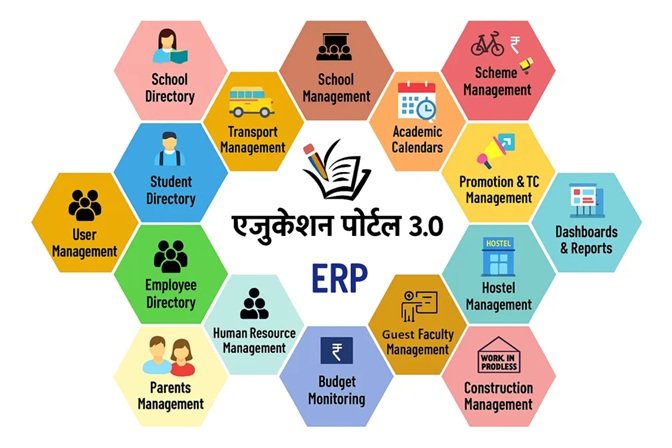
What Is Education Portal 3.0?
Education Portal 3.0 is the latest digital education management platform developed by the School Education Department, Government of Madhya Pradesh. It is designed to simplify school administration, teacher management, student records, attendance, examinations, and other educational services through a single online system. The portal replaces many manual processes with secure digital services, making school management faster, more transparent, and more efficient.
The official Education Portal 3.0 can be accessed here:
Official Website: Education Portal 3.0 Official Portal
Whether you are a teacher, school administrator, education officer, or guest faculty member, Education Portal 3.0 provides the tools needed to manage educational activities from one centralized platform.
What Is the Purpose of Education Portal 3.0?
The primary objective of Education Portal 3.0 is to digitize the management of schools across Madhya Pradesh. Instead of maintaining paper records for admissions, attendance, examinations, employee information, and student data, everything is managed online through one secure portal.
The portal also improves communication between schools and the education department while reducing paperwork and human errors.
Key Features of Education Portal 3.0
1. Student Management
Education Portal 3.0 maintains complete student records, including:
- Student admission
- Academic profile
- Attendance
- Examination records
- Transfer certificates
- Student mapping
- School history
Authorized schools can update and manage these records online.
2. Teacher and Employee Management
The portal provides various services for teachers and school staff, including:
- Employee registration
- Profile updates
- Service records
- Transfer-related information
- HR management
- Verification of employee details
This helps schools maintain accurate staff information digitally.
3. School Administration
School administrators can use Education Portal 3.0 to:
- Register new schools
- Update school information
- Manage school directories
- Monitor school performance
- Generate official reports
These features improve transparency and reduce administrative workload.
4. Online Login System
Every authorized user receives login credentials to access the portal securely.
Users simply visit the official login page:
Login Portal: Education Portal 3.0 Login
After entering their username, password, and captcha, they can access their dashboard. Password recovery is also available through the “Forgot Password” option.
5. Guest Faculty Management
Education Portal 3.0 also includes the Guest Faculty Management System (GFMS), allowing guest teachers to register, apply, and manage their profiles online.
Official GFMS Portal:
The GFMS module streamlines recruitment and management of guest teachers across government schools.
Benefits of Education Portal 3.0
Education Portal 3.0 offers numerous benefits for educational institutions.
Saves Time
Most school-related tasks can now be completed online, reducing paperwork and manual record keeping.
Better Data Accuracy
Since information is stored digitally, the chances of data loss and clerical errors are significantly reduced.
Improved Transparency
Education officers can monitor schools more effectively, while schools can maintain accurate and up-to-date records.
Secure Information
Only authorized users can access the portal using secure login credentials, helping protect sensitive educational data.
Faster Communication
Schools, teachers, administrators, and education officials can exchange information more efficiently through the centralized system.
Who Can Use Education Portal 3.0?
The portal is designed for multiple users, including:
- Government schools
- School principals
- Teachers
- Education officers
- District Education Officers (DEOs)
- Guest faculty
- Administrative staff
Different users receive access based on their roles and responsibilities.
How to Access Education Portal 3.0
Accessing the portal is simple.
- Visit the official website.
- Enter your username.
- Enter your password.
- Complete the captcha verification.
- Click Login.
If you forget your password, you can reset it using the Forgot Password feature available on the official portal.
Why Should You Use the Official Website?
Many blogs and informational websites explain how Education Portal 3.0 works. However, users should always perform registrations, logins, password resets, and official activities only through the government portal.
Official Government Website:
School Education Department – Education Portal 3.0
Using unofficial websites for login or personal information is not recommended. Independent informational sites also state that they are not affiliated with the Government of Madhya Pradesh.
Frequently Asked Questions
Is Education Portal 3.0 an official government website?
Yes. Education Portal 3.0 is operated by the School Education Department, Government of Madhya Pradesh.
Can teachers update their profiles?
Yes. Authorized teachers and education officials can update employee information and other records through the portal based on their permissions.
Is Education Portal 3.0 free?
Yes. It is an official government platform provided for authorized schools, teachers, and education department users.
Does Education Portal 3.0 support guest teachers?
Yes. Guest teachers can use the official GFMS portal to register, log in, and manage their profiles.
Conclusion
Education Portal 3.0 is an important step toward digital governance in education. By bringing student records, teacher management, school administration, and guest faculty services together on one platform, it helps schools operate more efficiently while improving transparency and data management.
If you need to access any official service, always use the government portal rather than third-party websites. This ensures your information remains secure and that you receive the latest updates directly from the School Education Department.
Official Portal: https://sederp.educationportal3.in