
Introduction
The Odisha School Teacher Transfer Portal is a web facility designed to assist eligible instructors in applying for transfers through the state authorities’ prescribed process. It helps in the management of instructor transfer requests and allows the education branch maintain in thoughts packages in line with applicable rules, trainer facts, and college requirements. Teachers may moreover be seeking a transfer for numerous motives, which encompass circle of relatives duties, clinical online system private trs, or a desire to move to their domestic district. The online gadget enables the software program application to be more organised and allows the branch to control requests digitally.
What Is the Odisha School Teacher Transfer Portal?
The Odisha School Teacher Transfer Portal is an internet platform used for filing instructor transfer requests under the applicable authorities’method. The dependable Transfer Request Portal is available through the HRMS Odisha internet website.
Official portal
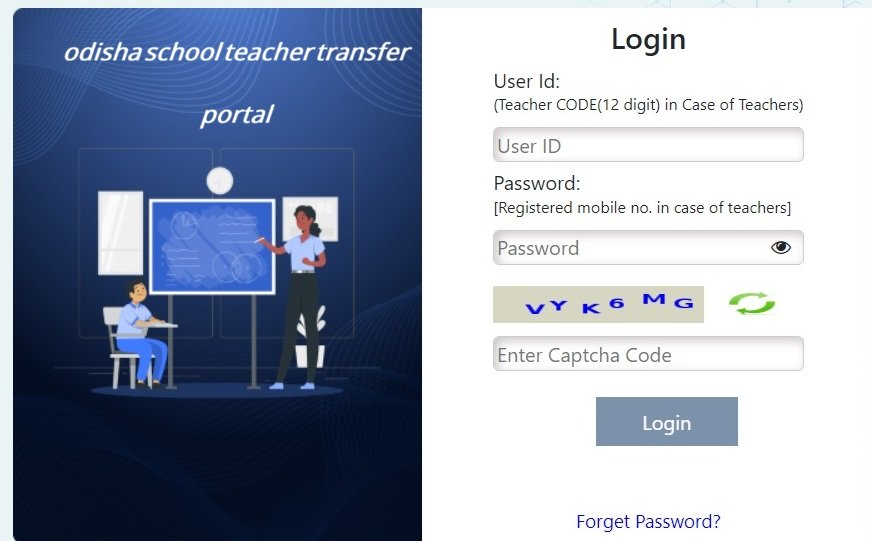
The portal’s login net web page asks clients to offer their cellular variety and an worker identifier, which include an HRMS ID, GPF range, or PRAN extensive range. It also uses mobile OTP verification. Teachers need to take a look at the instructions displayed at the reliable net site at the same time as submitting their details. The purpose of a web switch facility is to lessen dependence on paper-based processes and help the branch manner requests for employee records and other relevant data.
Important Information About the Odisha Teacher Transfer Portal
The following desk summarises the primary records instructors need to rPortal Official transfer portalPortal Official transfer portale using the portal.
| Particular | Details |
|---|---|
| Portal name | Odisha School Teacher Transfer Portal |
| Official transfer portal | transfer.hrmsodisha.gov.in |
| State | Odisha |
| Department | Government of Odisha, School and Mass Education system |
| Main purpose | Online submission and processing of eligible transfer requests |
| Login details | Registered mobile number and applicable employee identification number |
| Verification | Mobile OTP and other portal-required checks |
| Transfer grounds | Subject to the applicable government guidelines |
| Application dates | As announced by the competent authority |
| Transfer approval | Subject to eligibility, verification, vacancies, and official decisions |
| Status information | Check the portal or contact the concerned education office for available updates. |
The portal’s requirements and available services can change. Teachers need to verify the contemporary day instructions on the authentic net website online before making use of.
How to Access the Odisha School Teacher Transfer Portal
Teachers can get proper access to the transfer facility from a laptop or a cell phone with an internet connection.
Follow these steps:
- Open a web browser on your cellular telephone or laptop.
- Visit the official internet site at
- Read the commands provided on the transfer request net web page.
- Enter your registered mobile number.
- Enter the specified HRMS ID, GPF amount, or PRAN range.
- Complete the CAPTCHA, if asked.
- Use the OTP verification choice to accumulate a verification code on your registered cell variety.
- Enter suitP and proceed every day with the portal’s instructions.
Make certain the facts entered ssuisuareimate contact infinformationur cellular range has changed or your employee records are wrong, contact the right branch or legal place of job for help.
Never share your OTP or distinct non-public login records with an unauthorised individual.
How to Apply for a Teacher Transfer in Odisha
The software technique is based totally upon at the transfer magnificence, the department’s cutting-applicantstionscheckcheckhethelatestlatestr no longer the pthe ortal iinstead s open for prograoutdateddgible intimetabletimetableve the first rate notification in region of relying on an vintage software program time table.
Step 1: Check transfer Notification
Before beginning the software, take a look at whether or not the switch software window is open. Read the notification carefully to recognize the eligible teacher instructions, normal switch grounds, required files, and critical dates. Some switch sports activities may also cover specific groups of teachers in place of each trainer in the country.
Step 2: Log In to the Official Portal Open Transfer. Open the
OpenTransfer Open t:: Transfer Request Portal dnd eenter yourvery own dependable employee facts and registered cellular number. If the tool cannot validate your facts, test whether or no longer you entered the suitable identification amount and contact the applicable place of job if the trouble continues.
Step 3: Verify Your Teacher Profile
Review the private, professional, and issuer facts displayed by means of using the gadget, wherever this facility is to be had. These data can also embody your current-day posting, college, designation, and distinct information relevant for your switch request. Incorrect statistics can cause issues during verification. Ask the accountable authority to correct any discrepancies via the appropriate method.
Step 4: Select the Appropriate Transfer Category
Choose the switch type or grounds request through the current notification. Depending on the applicable guidelines, a switch exercising may additiinvolvesclude intra-distranotheranotherer-district requests . An intrsametrict switch generally technique transferring involvesh other eligible posting withanotheranotherl subjectAn inter-district switch typically manner moving from one district to every other, difficulty to the relevant regulations.
Step 5: Enter the Required Details
Complete the application fields correctly. Provide the requested information about your transfer preference, reason for asking for a switch, and other information required through the portal.
Step 6: Upload Supporting Documents
If the software calls for assisting documents, upload smooth and valid copies within the unique layout. Medical or one-of-a-kind precise-ground programs also can require greater proof under the applicable notification. The particular listing of files can range, so use the current legitimate instructions in desire to a present day tick list by myself.
Step 7: Review and Submit the Application
Before filing, take a look at all of the records for spelling errors, incorrect identification numbers, and missing facts.
Submit the software details after reviewing it carefully. Save the acknowledgement receipt or confirmation statistics if the portal gives them.
Step 8: Follow the Official Updates
After submitting, you may be required to check the relevant departmental notices for additional instructions. You may also be required to complete extra verification or comply with a specific preference-filling technique.
Eligibility authorities: School Teacher Category
Eligibility is predicated upon the relevant order/notification and the magnificence of instructor covered in a specific transfer workout. The following desk gives guidance. It isn’t an opportunity to the respectable eligibility rules.
| Eligibility factor | What teachers should check |
|---|---|
| Employment category | Whether their designation is included in the current transfer notification |
| Service information | Whether service records meet the stated requirements |
| Current posting | Whether the existing school and district are covered by the transfer exercise |
| Transfer category | Whether intra-district or inter-district transfer is permitted |
| Transfer grounds | Whether the stated reason is allowed under the applicable rules |
| Supporting evidence | Whether required certificates and documents are available |
| Application period | Whether the portal is accepting applications for the relevant category |
| Departmental verification | Whether employee details and submitted grounds can be verified |
Teachers want to confirm their eligibility with the relevant Block Education Officer, District Education Officer, or terrific capable authority even as the hints are unsure.
Documents Required for Teacher Transfer Applications
The files required for an software depend on the transfer elegance and the grounds said via way of the usage of the teacher. Some programs might also require fine worker information, on the equal time as others also can want helping certificate.
Common documents or data that can be relevant encompass:
- HRMS ID, GPF large variety, or PRAN great variety, as relevant.
- Registered cell range.
- Employee identity and carrier records.
- Current college and posting data.
- Transfer software acknowledgement, if already submitted.
- Medical certificate or critiques at the same time as required for a systematic-ground request.
- Other supporting data specific to the valid notification.
This listing is indicative as opposed to exhaustive. Teachers must no longer add useless sensitive files or assume that a particular certificate is mandatory unless the applicable instructions require it.
How to Check Odisha Teacher Transfer Application not it has
After filingreceivedware program, instructors may also want to understand whether or no longer it’s been acquired, demonstrated, or accepted.
To check popularity, follow these steps:
- Visit the official Transfer Request Portal.
- Sign in or complete the verification process the portal offers; take a look at the facility.
- Look for the software asset acknowledgement section
- Entectionhe asked software program or employee facts.
- Review the records displayed through the use of the device.
- If no reputation is to be had, contact the worried training place of job for rationalization.
The actual time taken can also vary depending on the transfer process and portal configuration. If the software program is pending, it does no longer always suggest it’s been rejected. The request can also, however,r require record verification, eligibility tests, emptiness assessment, or an administrative choice.
Common Problems and Their Solutions
Teachers may moreover furthermore come across technical or administrative troubles at the equal time as the usage of the switch portal. The following table explains sensible steps to take.
| Problem | Suggested solution |
|---|---|
| OTP not received | Check the registered mobile number and network connection, then request another OTP if permitted. |
| Employee details not validated | Check the HRMS ID, GPF number, or PRAN number for typing errors. |
| Incorrect teacher profile | Contact the authorised office responsible for maintaining employee records. |
| Portal not opening | Try again later or use an updated browser and a stable internet connection. |
| Application window closed | Check the latest official notice for any extension or new schedule. |
| Document upload failure | Verify the permitted file format, file size, and document clarity. |
| Application pending | Check official updates and ask the responsible authority whether further action is required. |
| Transfer not approved | Read the applicable rules and seek clarification from the competent authority. |
Teachers ought to use decent channels to solve troubles concerning their employee facts or software program choices. Avoid giving login credentials to unofficial dealers.
Benefits of the Odisha School Teacher Trconsistentlyconsistentlytal
An online ttransfer toolcan offer several administrative benefits whilst used cconsisteconsistently withd tips.
Convenient software way: Teachers can put up eligible requests digitally wwithoutdepending vn paper-based submissions.
Better file manipulate: Digital packages assist preserve information of requests and associated worker information.
Vacancy-primarily based making plans: OSEPA has defined that teacher profile statistics and college vacancy data can guide transfer selections and help hold suitable student-instructor ratios.
More organised verification: Online data can assist officers in examining applications and statistics systematically.
Improved access to information: Teachers can search for advice from the portal and reputable notifications, deadlines, and one-of-a-kind available updates.
These advantages recommend that your request may be authorized or that processing will normally be immediate. Administrative alternatives stay problem to the applicable pointers and the department’s requirements.
Important Rules Teachers Should Remember
Teachers need to keep the following elements in mind before filing a software program.
First, use the official portal and follow the latest notification.Transfer tips, eligibility conditions, software dates, and required documents can change between programs.
Second, input correct records. Delays in the various software program applications and applications might also put off verification.
Third, preserve a duplicate of the software acknowledgement and any applicable departmental corresponde…
Fourth, avoid correspondence differences between a software program and a recent transfer order. Teachers need to observe the formal joining and relieving instructions issued through the competent authority.
Finally, do not depend on unofficial social media posts for final dates or approval claims. Confirm essential statistics via the professional portal or the applicable education department.
Frequently Asked Questions (FAQs)
1. What is the actual Odisha School Teacher Transfer Portal?
The legitimate Transfer Request Portal is available at Teachers want to apply the present day instructions displayed on the authorities portal.
2. How can I log in to the switch portal?
Visit the expert portal and enter the requested credentials and employee identity data. Complete the verification process together with OTP verification, if required.
3. Can I examine for an inter-district switch?
Inter-district transfers may be subject to specific sports quotas. Check the latest notification to confirm whether or not your trainer category is eligible and under what conditions.
4. Is the Odisha trainer switch software approach commonly open?
No. Application intervals may be limited to dates set by the department. Check the official notification for the current timetable.
5. Does filing an internet software guarantee a transfer?
No. The software program wants to be assessed againsapplicableee guidelines. Approval may additionally rely on eligibility, verification, vacancies, and the selection of the in a position authority.
6. What should I do if I do no longer collect an OTP?
Check your registered cell number and network connection. If the problem continues, contact the normal portal guide or the applicable training place of work.
7. Where can I find proper instructor switch updates?
Check the switch portal and the Odisha School and Mass Education Department’s official website. You can also contact the relevant district education office for clarification.
Conclusubmit transfer
The Odisha School and Mass Education Department’s official website offers a web path for eligible instructors to submit transfer requests to the government’s prescribed portal, which permits digital application management and allows officials to recall requests using employee facts, school vacancies, and applicable transfer regulations.
Teachers making plans to use want to begin through checking the extremely-current notification, verifying their employee records, data the eligibility conditions, and getting ready the required files. They want to moreover maintain a report of their submission and observe real instructions at a few stage in the technique.
For reliable records, visit the right portal at and are looking for advice from the applicable training department whilst you need explanation approximately eligibility, utility dates, or transfer approval.
1 thought on “Odisha School Teacher Transfer Portal: Online Application, Login, Eligibility and Status Check”